Features Models Studio Lab Docs News Open the workspace
Newsroom

Every release, with the screen to prove it.

Notes from the Eltes build: the site served from Supabase Storage as well as GitHub Pages, real accounts on the static site, the welcome email your own Supabase project sends through Resend, the desktop apps for Windows, macOS and Linux, the language model you train yourself in the browser, the embers that answer your pointer on the new-chat screen, the rebuilt galaxy sky, the Obsidian black chat shell, the effects library that draws its own imagery, Studio's editor and Linux terminal, and the five-step website workflow. Each screenshot is the real interface — no mockups, no stock renders.

v3.18.0 Updated 20 Oct 2026 7 screenshots Every link in this feed is live
v3.18.0 Latest release

The same site, in two places.

Eltes is now published from GitHub Pages and from Supabase Storage — the same files, the same look, the same sign-up and the same welcome email. The Supabase copy lives in the very project that holds the accounts, so the site, its database and its mail are one deployment.

  • Real URLs, no build step — …/storage/v1/object/public/eltes/index.html serves the pages over Supabase's CDN with proper content types, and relative assets/… links resolve exactly as they do on Pages.
  • Honest about what it is — Supabase has no static-site product, so this is a public Storage bucket, not a custom domain. The docs say so, and the mirror is labelled a mirror.
  • One command to refresh — site-publish copies the published files out of the repository, upserts them, and reports every failure. It refuses to run without ELTES_PUBLISH_TOKEN, and it never publishes the SQL, the tests or the desktop harness.
  • The welcome email is unchanged — signing up on either address creates the account in Supabase and sends Welcome to Eltes AI Workspace through Resend, as long as RESEND_API_KEY is set. Until then every surface says so.
v3.17.0 Accounts · mail

Sign up on the static site. Get a real email.

The GitHub Pages copy now creates real accounts in your own Supabase project — email and password, confirmation, magic link, password reset, sign-out and a session that survives a reload. The moment an account exists, Welcome to Eltes AI Workspace leaves through your own Resend account, free, usually within a second.

  • No server of your own — a Supabase Edge Function builds the single-use link and calls Resend. GitHub Pages stays a static host; the browser talks to your project directly with a publishable key, and row-level security decides what it may touch.
  • The letter can be the confirmation — turn confirmation on and its link verifies the address before it opens the workspace; leave it off and a new account works before any mail key exists. Password resets and sign-in links are their own letters, from the same template and the same free account.
  • Nothing pretends — with no RESEND_API_KEY the panel says Not sent — Supabase has no RESEND_API_KEY yet. A bounced address is skipped before the provider call; a second welcome is refused by a unique index in Postgres; the function allows six messages per network and three per address every ten minutes.
  • Your local profile is still there — no config.js, a desktop build, or one click on Use a local profile instead and Eltes runs exactly as before, with the Node/desktop mail route.
v3.16.0 Mail · local server

The welcome email is real, and it is yours.

Create a profile and Welcome to Eltes AI Workspace arrives in the inbox — sent by the server on your own machine through your own free provider account. Resend, Brevo and any SMTP mailbox are supported. With nothing configured, the message is written to a real .eml outbox instead of pretending to send.

  • Free, no card — Resend gives 3,000 messages a month, Brevo 300 a day, and an SMTP mailbox costs whatever your host already charges. One environment variable each.
  • No middle man — the browser posts to /api/email/welcome on the same origin. Eltes has no mail server, no list and no tracking pixel; the address never leaves your provider call.
  • Bounces count — a 5xx at RCPT TO is a hard bounce in the same request, provider webhooks are normalised, and hard bounces are remembered so the next send never touches the network.
  • Honest states — Sent via resend, Saved to the local outbox, No mail server on this host on the static site, and the provider's own error text when it refuses.
v3.15.0 Desktop · harness

Eltes becomes a desktop app.

A real harness in desktop/ builds a Windows installer and a portable .exe, macOS disk images for Apple silicon and Intel, and a Linux AppImage and .deb. Each one is the same site in a native window, with the local server, Studio, the terminal and Eltes Lab already inside — no Node installed, no tabs, no second app to keep in sync.

  • Self-contained — the shell starts the bundled server with its own binary (ELECTRON_RUN_AS_NODE) on a free loopback port, then loads the workspace from it. Nothing to install first.
  • Hardened window — context isolation, no node integration, sandboxed renderer, five bridge calls, and navigation locked to the app's origin. Other links open in your browser.
  • Fails loudly — if the server will not start, a recovery screen names the error, the data folder and the log, with a Try again button instead of a blank window.
  • Built where it runs — GitHub Actions builds Windows on Windows, macOS on both Apple silicon and Intel runners, Linux on Ubuntu, and attaches every installer to the tagged release.
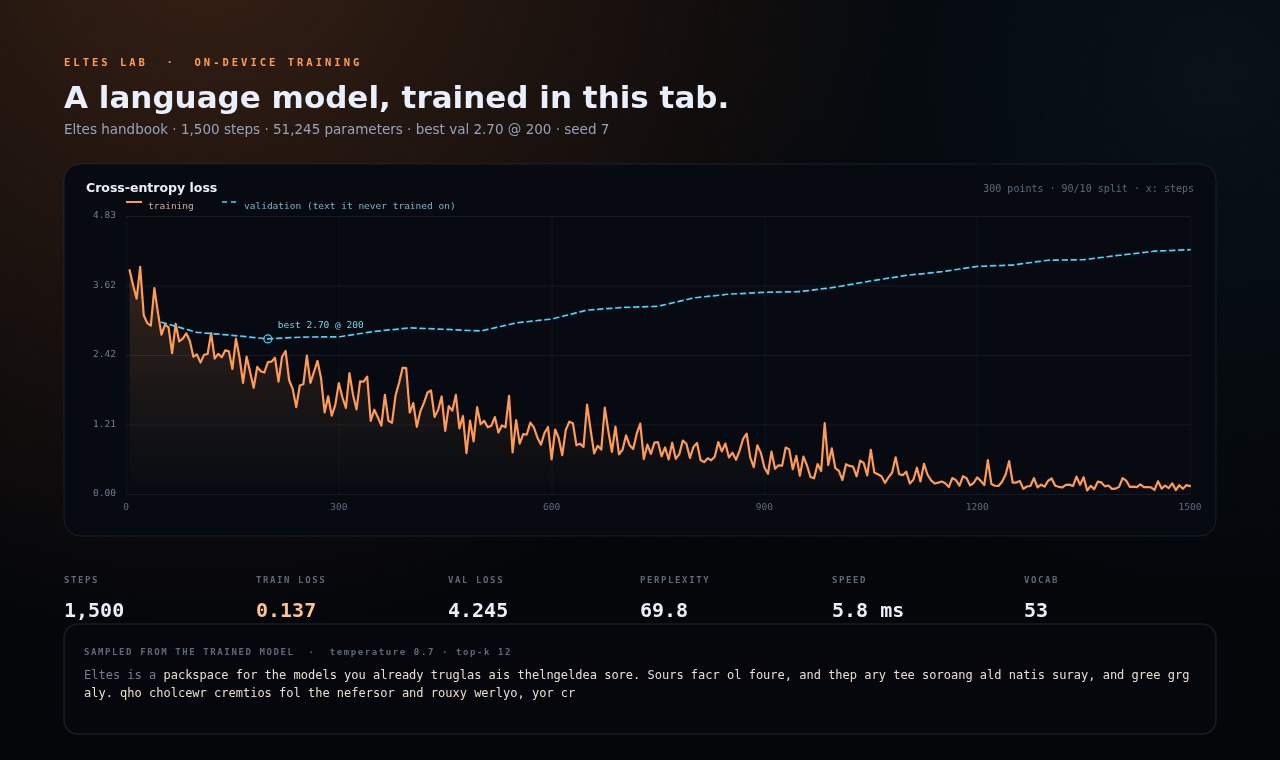
A real Lab training run: orange cross-entropy loss falling from 3.9 towards zero over 1,500 steps, a dashed blue validation line bottoming out at 2.70 around step 200 and then climbing, six readouts and a sampled continuation below. Full size
A real 1,500-step run of the shipped model, drawn by the page's own chart code. The dashed validation line bottoms out at 2.70 and then climbs: that is overfitting, shown rather than hidden. The text at the bottom is the model's own sample. lab.jpg · real run
v3.14.0 Lab · training

Train the model yourself, then read the curve.

Lab is a real neural network you train in the tab: 51,245 weights, hand-written backpropagation, Adam, live training and validation curves, and a checkpoint in localStorage. It is a character-level model, and the page is honest about what that means.

  • It actually learns — the loss falls because the weights change, not because a script prints a nicer number. A seeded run is reproducible; the same setup draws the same curve.
  • The honest curve — validation loss on held-out text is drawn next to training loss, with the best point marked. On a corpus this small it turns up, and the page says why.
  • A pass-mark test — the memorisation demo trains on one paragraph until the loss reaches zero, then recites it back; match is measured character by character, usually above 90%.
  • Yours, on-device — save the model and Eltes Lab-1 appears in the workspace picker. It quotes a continuation and states its limits; no key, no upload, no network request.
The Eltes new-chat screen: orange embers and a soft warm glow around the pointer over the black workspace. Full size
A still from the live effect: the pointer was swept across the pane, and the embers followed. No video, no image files. embers.jpg · canvas capture
v3.13.0 Embers · pointer

The empty chat now answers your pointer.

Move the mouse across the new-chat screen and a hearth of orange embers follows it: a warm glow, eight orbiting sparks, wispy updraughts and a slow rain of embers rising from the composer. It is drawn on one canvas — no libraries, no images.

  • Speed is heat — move faster and the glow brightens, sparks fly and the trails lengthen; stop and it settles to a gentle burn.
  • Click to stoke it — a click throws a burst of sparks and embers.
  • Only where it belongs — the effect fades out the moment a conversation starts, and pauses with the tab.
  • Cheap and respectful — 30 fps, DPR capped at 1.75, a still frame under reduced motion (system or Settings → Reduce motion).
v3.12.0 Galaxy v2 · Obsidian chat

A deeper sky. A blacker chat.

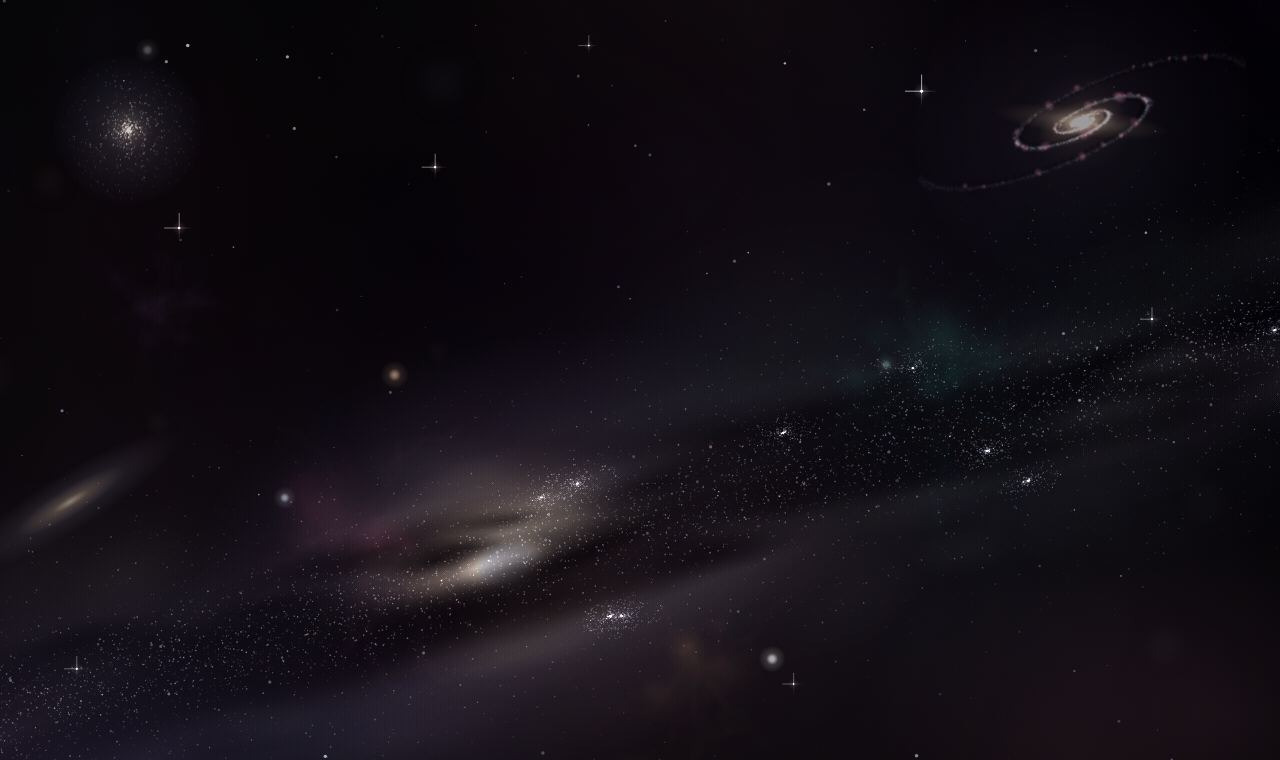
The backdrop was rebuilt from the ground up — a spiral galaxy, a globular cluster, an edge-on galaxy, coloured nebulae and diffraction spikes around the brightest stars. The chat shell went the other way: blue is gone, and Obsidian is true black from the sidebar to the composer.

The rebuilt Eltes sky: a diagonal river of stars with a bright cream core and dark dust lanes, a spiral galaxy in the upper right, a globular cluster upper left, an edge-on galaxy lower left and coloured stars throughout. Full size
The band, the spiral, the cluster, the dust and the coloured stars — all painted in the browser. galaxy.jpg · canvas capture
  • More universe — a tilted Milky Way with a hot cream core and a dark rift, plus a spiral, a cluster and a distant lens.
  • Obsidian chat — #000 surfaces, silver accents, no dark blue anywhere. Graphite stays for anyone who wants grey.
v3.11.0 Galaxy backdrop

The whole site starts floating through space.

Every marketing and documentation page moved in front of a living sky: a tilted band of stars, drifting parallax layers and the occasional meteor, drawn in one canvas with no video and no image files. v3.12 rebuilt the artwork on top of it.

v3.10.0 Effects

Draw the imagery. Don't download it.

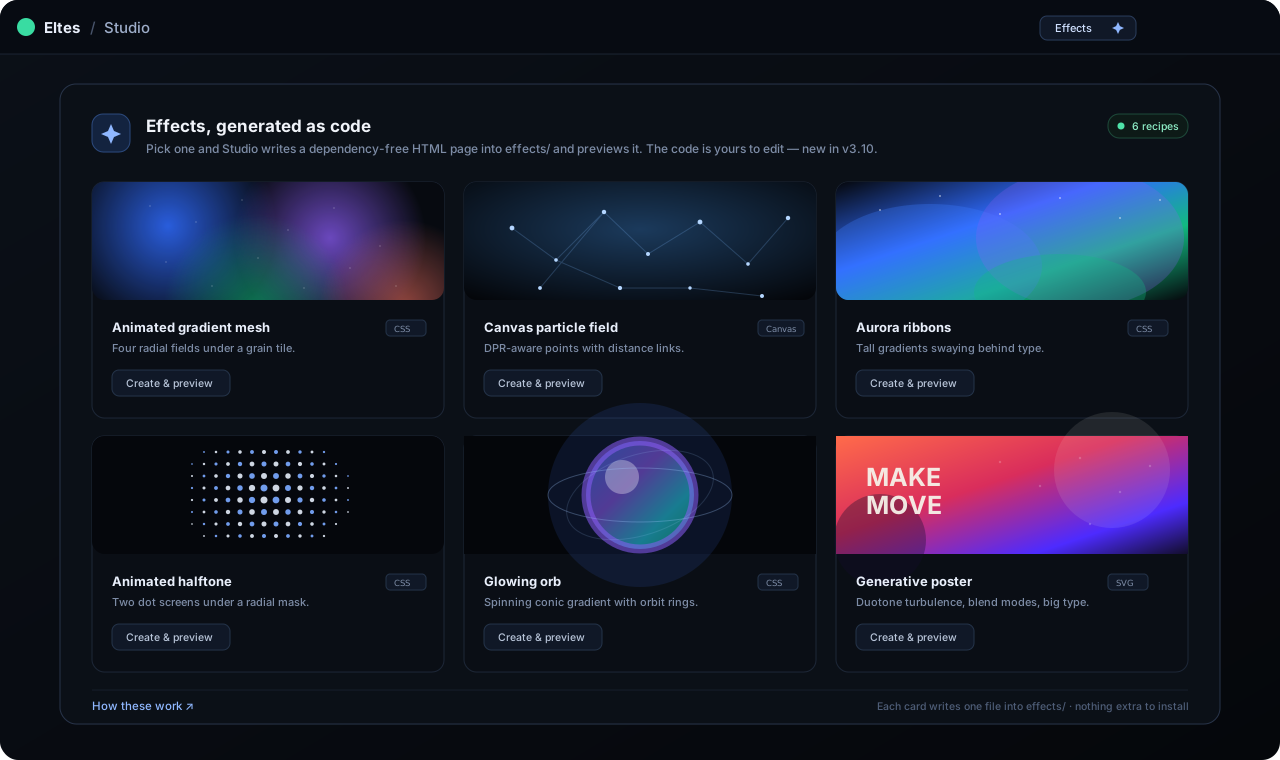
A library of six code-generated visuals — gradient mesh, particles, aurora, halftone, orb and poster — each written into your project as a readable HTML file and previewed in Studio.

The Eltes Studio effects dialog: six cards with live previews of a gradient mesh, a particle field, aurora ribbons, a halftone pattern, a glowing orb and a generative poster. Full size
Studio → Effects: six recipes, each one a self-contained HTML page. “Create & preview” writes the file and reloads the pane. effects.svg
  • One click, one file — effects/<name>.html in the tree, open in the editor, loaded in the preview.
  • Real documentation — a full guide section from the first gradient to a built dist/.
  • Build-aware — the starter build.mjs copies subfolders, so effects/ ships with the site.
  • Honest progress — generating an effect ticks the workflow's create and preview steps.
v3.9.0 Workflow

A guide for the whole build.

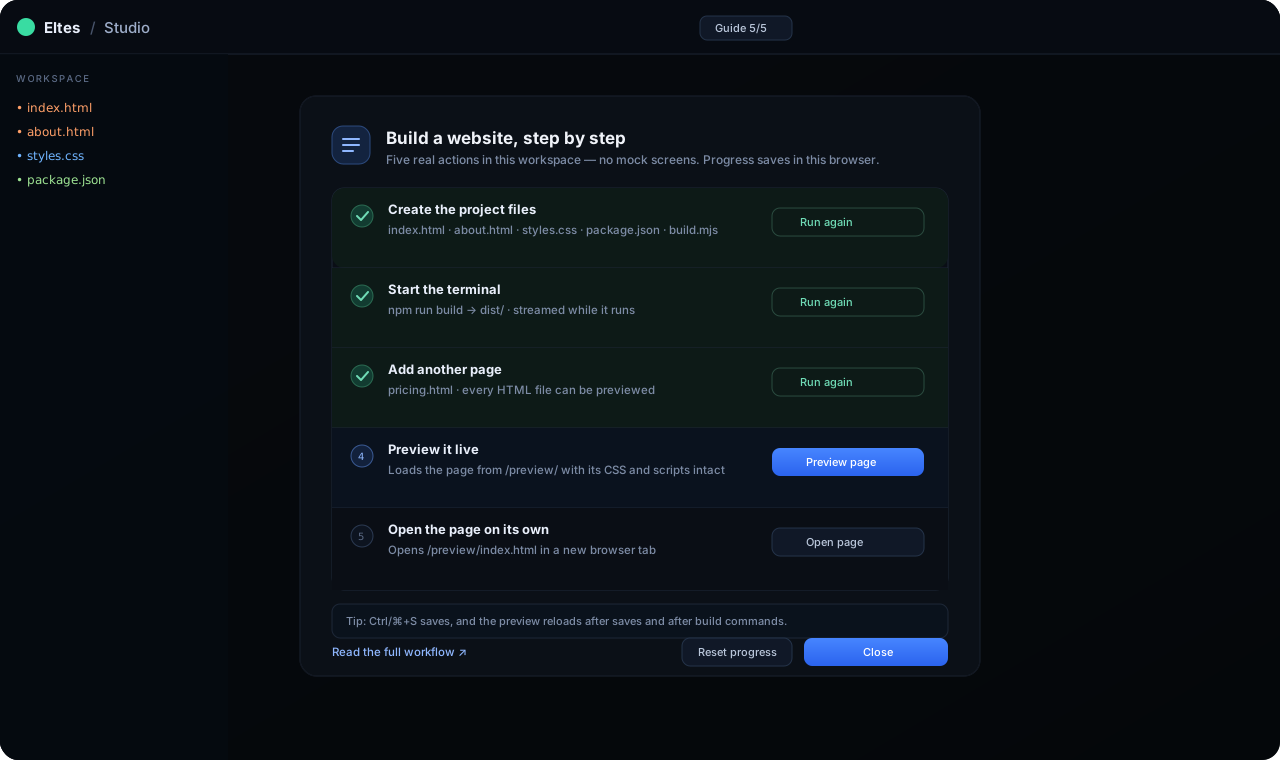
The website workflow is now written down and wired into Studio. Six written steps cover the terminal, file creation, live preview and the build; the in-app Guide runs the same actions and ticks them off as they really happen.

The Eltes Studio guide dialog with five steps: create the project files, start the terminal, add another page, preview it live and open the page on its own. Four steps show Run again, one shows Preview page. Full size
The Guide: five steps, each backed by the real action. Progress is stored in the browser, not simulated. workflow.svg
  • Docs — open the workspace, start the terminal, create files, preview, pop out, build.
  • Guide dialog — Create files, Run build, New file, Preview page and Open page.
  • Honest progress — a step only ticks when the matching event fires.
  • Tested — a contract test keeps the docs and the dialog in sync.
v3.8.0 Studio

Files, editor, preview, terminal — one window.

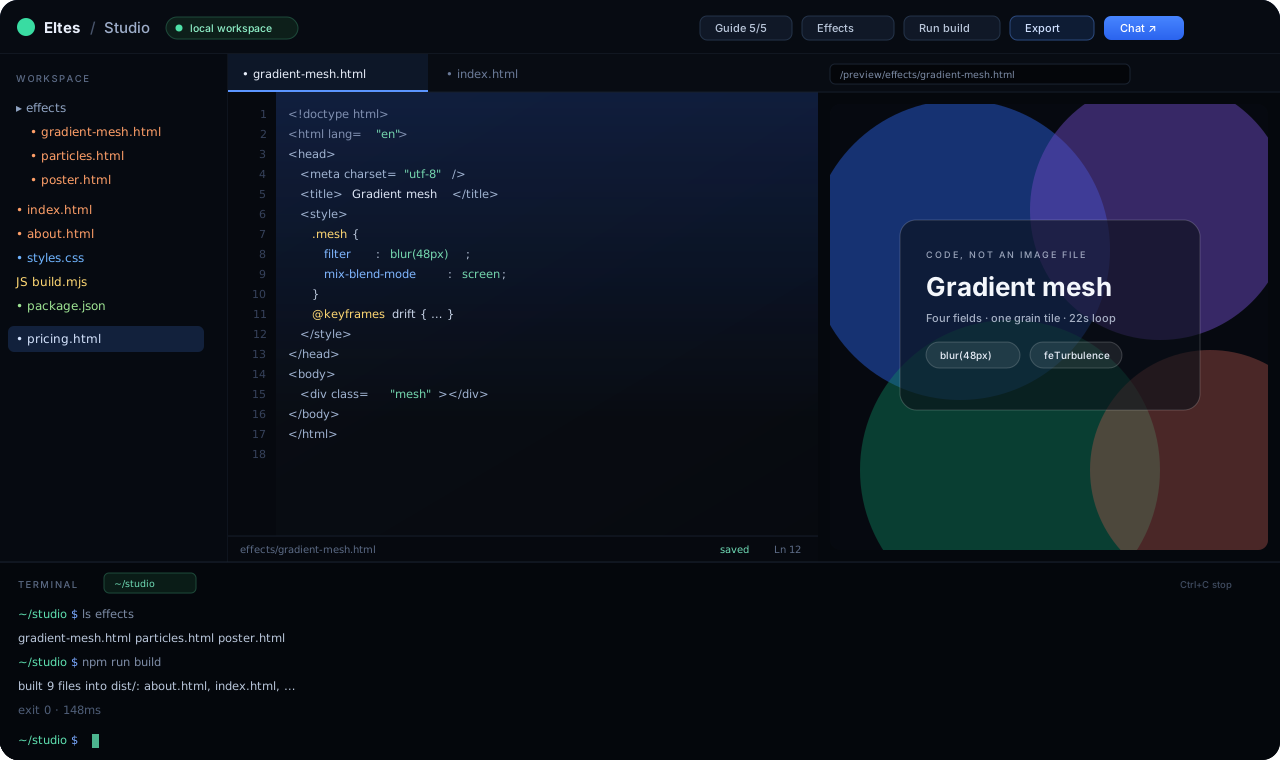
Eltes Studio is a coding workspace served next to the app. A real shell runs in .studio/, every HTML file previews at /preview/ with its CSS and scripts intact, and saving reloads the pane.

Eltes Studio: the file tree with an effects folder, a code editor showing gradient-mesh.html, a live preview of the gradient mesh effect and a terminal that ran npm run build. Full size
Studio at 1280×760: tree, tabs, editor, preview and a real Linux shell with streaming output. studio.svg
  • Any HTML previews — the pane follows the file you open, not a fixed index.
  • Auto-save, auto-reload — edits and build output both refresh the preview.
  • Real commands — ls, node, npm run build, 60-second limit, Ctrl+C to stop.
  • Safe by default — token-protected routes confined to .studio/.
v3.7.1 Interface

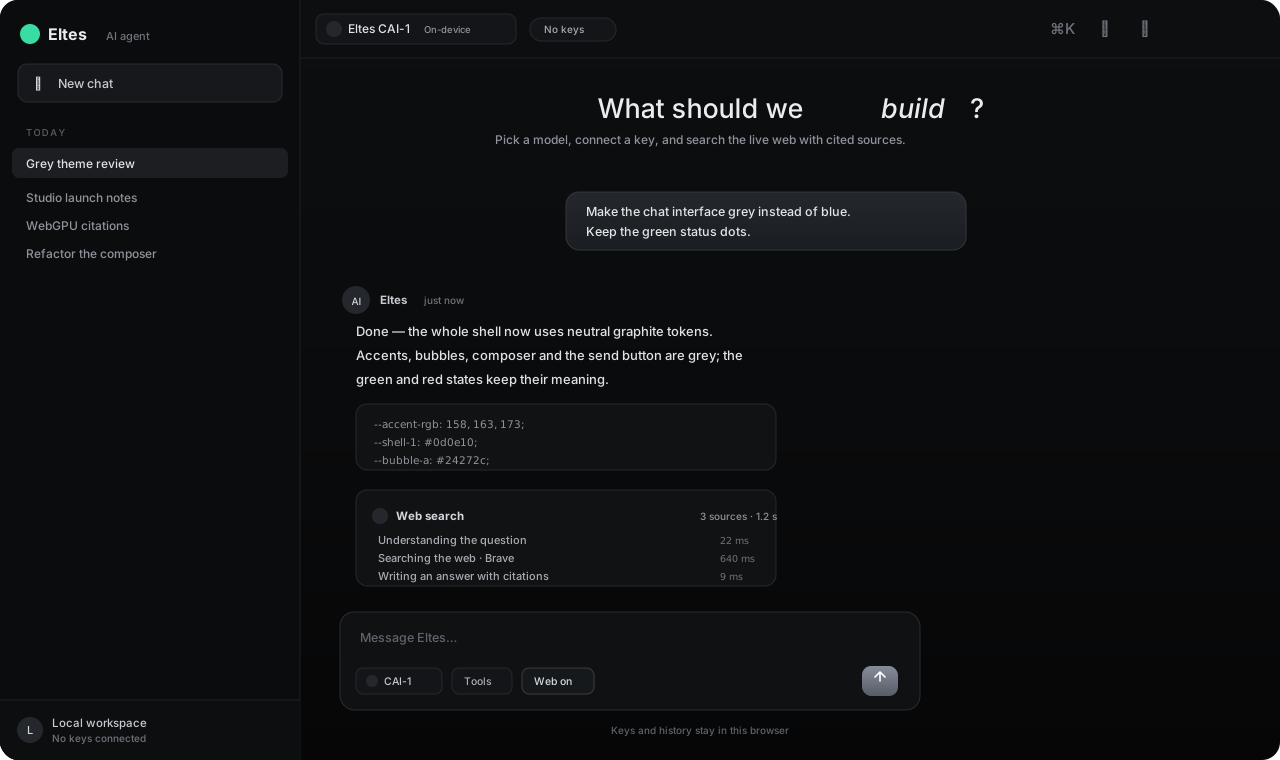
Grey chat, not blue.

The workspace shipped Graphite: neutral grey shell, bubbles, accents and send button, with Midnight blue as the second theme. v3.12 replaced Midnight with Obsidian black.

The Eltes chat interface in the Graphite theme: dark grey sidebar, grey user bubble, grey send button, a web-search thinking panel and the composer. Full size
Graphite: accents, bubbles and composer are neutral; green stays green where it means “running”. theme.svg
  • Grey by default — data-theme="grey" on the app shell.
  • Tokenised — accents, panels and gradients come from CSS variables.
  • Persisted — the choice lives in eltes.settings.v1 and updates the browser chrome colour.
  • Reversible — switch between Graphite and Obsidian in Settings → General, no reload.

Try the newest build

Studio runs locally with npm start; the docs cover the rest.